
Kavij: Free AI Background Remover Review
kavij.com · checked 15 Oct 2026
Free, open-source AI background remover for the web, APIs, and self-hosted setups.
How it plugs in
Signal on AI Background Removers9.2#2 of 94
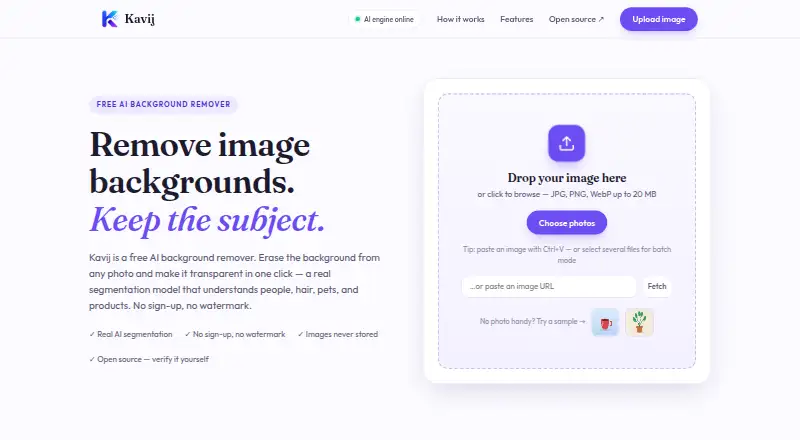
Kavij removes image backgrounds and creates transparent cutouts. You can upload JPG, PNG, or WebP files of up to 20 MB, process batches, replace backgrounds, and make manual touch-ups. The web editor handles changes locally in your browser, while AI removal runs on Kavij’s server. An MIT-licensed Docker service provides a self-hosted API.
Review
In a line
Kavij is an AI image background remover. It separates subjects from their backgrounds and produces transparent cutouts.
What it does
Upload a JPG, PNG, or WebP image, or paste an image URL. Its models cover people, hair, pets, products, illustrations, and anime, with standard, precise, fast, and anime choices.
You can refine hair and fur, erase or restore areas, and select shapes with pen, rectangle, or circle tools. Results can stay transparent or use a solid color, gradient, blur effect, or your own photo as the background. Before-and-after comparison, undo, and reset controls are included.
The web tool supports batch processing and accepts files up to 20 MB. Downloads are transparent PNG or JPG files. An edge detector keeps the interface usable when the AI engine is unavailable.
How it connects
Kavij offers web access alongside API and self-hosted versions. Its self-hosted service uses Docker and includes a multipart POST /api/remove endpoint for transparent PNG results and a GET /api/health endpoint for engine status.
The API lets you choose the standard, fast, precise, or anime model and turn alpha matting on or off. Docker files are supplied, and the model is stored in a cached volume. Its source is MIT-licensed, and the self-hosted API does not charge per call.
AI background removal sends an image to Kavij’s server over HTTPS, where it is processed in memory and discarded after the request. Browser-side tools handle brushes, selections, background adjustments, and downloads. Kavij says images are not stored, used for training, or shared with third parties.
Good fit
Kavij suits people who need transparent product, portrait, pet, illustration, or anime cutouts, including commercial work. It also fits teams that need batch processing or an API they can run themselves.
The four models and optional hair-and-fur refinement give users different ways to balance speed and detail.
Watch for
The web tool accepts files no larger than 20 MB. AI removal depends on sending the image to Kavij’s server, even though later editing runs in the browser.
Check whether the Docker-based self-hosted service fits your setup before choosing it. The listed API returns transparent PNG output, while web downloads can be PNG or JPG.
Pricing
Kavij is free. Its Free plan requires no sign-up, adds no watermark, and has no per-image limit. JPG, PNG, and WebP files can be uploaded up to 20 MB. The self-hosted API page says it has no per-call fees.
Verdict
Choose Kavij if you want a no-cost background remover with browser editing, commercial use, batch work, and an open-source self-hosted API. It covers common subjects plus anime and offers several segmentation models.
Consider another tool if a 20 MB upload ceiling does not fit your files, or if your workflow cannot send AI-processing images to an external server.
Our take
Kavij is a sensible choice for anyone who needs free background removal without sign-up or watermarks. Its support for commercial use, batch work, several subject types, and four models covers a broad set of cutout tasks. The MIT-licensed Docker service is useful when you need to host the API yourself, and there are no per-call API fees. The key tradeoffs are the 20 MB web upload ceiling and server-side AI processing, although Kavij says processed images are discarded and not used for training.
- Free plan needs no sign-up and adds no watermark
- Open-source MIT-licensed self-hosted API
- Batch processing and commercial use are supported
- Standard, precise, fast, and anime models are available
- Browser-based touch-up and background replacement tools
- Web uploads are limited to 20 MB
- AI removal sends images to Kavij’s server
- Self-hosting requires a Docker-based setup
- Web results download as PNG or JPG only
- Pick it ifFree transparent cutouts for people, products, pets, and illustrations; Teams needing batch work or a self-hosted removal API; Commercial images that need manual edge touch-ups
- Skip it ifYour source files exceed the 20 MB web upload limit; AI processing must happen entirely on your own device; You need output formats beyond PNG and JPG
Pricing
Kavij lists one Free plan: no sign-up, no watermark, no per-image limit, and uploads up to 20 MB. The self-hosted API has no per-call fees.
- FreeNo sign-up · no watermark · no per-image limit · JPG/PNG/WebP uploads up to 20 MBFree
As kavij.com lists them, checked 15 Oct 2026.
Questions
Is Kavij free?
Yes. Kavij’s Free plan requires no sign-up, has no watermark, and has no per-image limit.
Which image formats does Kavij accept?
The web tool accepts JPG, PNG, and WebP uploads. Files can be up to 20 MB.
What files can Kavij export?
Web results download as transparent PNG or JPG files. The API returns a transparent PNG.
Can Kavij replace the background?
Yes. You can keep transparency or use a solid color, gradient, blur effect, or your own photo.
Does Kavij offer an API?
Yes. Its Docker-based self-hosted service provides POST /api/remove and GET /api/health endpoints, with model selection and alpha-matting options.
Are uploaded images stored?
Kavij says images are processed in memory and discarded after the request. It says they are not stored, used for model training, or shared with third parties.
Can I run Kavij myself?
Yes. The self-hosted API includes Docker files, downloads its model into a cached volume, and uses source code under the MIT license.
Near it
All alternatives →- B
 BackgroundRemover#1 on this board
- CPCutout.Pro#3 on this board
- P
 Pixelcut#4 on this board
- S
 Slazzer#5 on this board
- L
 LocalBG#6 on this board
- U
 unbagrnd#7 on this board
- EB
 Erase.bg#8 on this board
- ZAZawa AI Background Remover (formerly X-Design)#9 on this board
- P
 PhotoScissors#10 on this board
- PBPhotoKit Background Remover#11 on this board